
Markdown, made lucid.
A native macOS Markdown reader and editor built for technical documents — equations, chemistry, Mermaid diagrams, code, and tables rendered as one coherent reading experience.
Swift & WebKit
Native macOS binary without Electron or bundled Chromium.
Local-First Privacy
Documents stay on your Mac. Zero telemetry or network tracking.
Offline STEM Engine
KaTeX, mhchem, and Mermaid bundled directly into the app.
Apple Silicon Native
Engineered specifically for arm64 performance and battery life.
Markdown is simple. Technical Markdown is not.
The moment a technical document contains mathematical equations, state diagrams, wide data tables, syntax-highlighted code blocks, and callout alerts, most Markdown tools begin to feel like a generic browser with a stylesheet.
Equations clip against narrow margins. Diagrams shrink until labels become unreadable. Wide tables overflow awkwardly. And editing requires constantly jumping between disparate windows.
Lucid is built so that complexity stays in the document — not in the reading experience.
Built to read, not just render.
Lucid Reader treats Markdown as a publication rather than styled HTML. Typographic rhythm, vertical flow, heading hierarchy, and margin clearances are tuned to eliminate visual fatigue during multi-hour technical reading sessions.
Translucent NSVisualEffectView toolbar that content scrolls beneath, optically aligned with native macOS traffic lights.
Proportional headings with subtle hover anchor links for deep-document navigation.
Structured data tables with alternating row contrast, readable headers, and horizontal overflow preservation.
One document. Coherent reading.
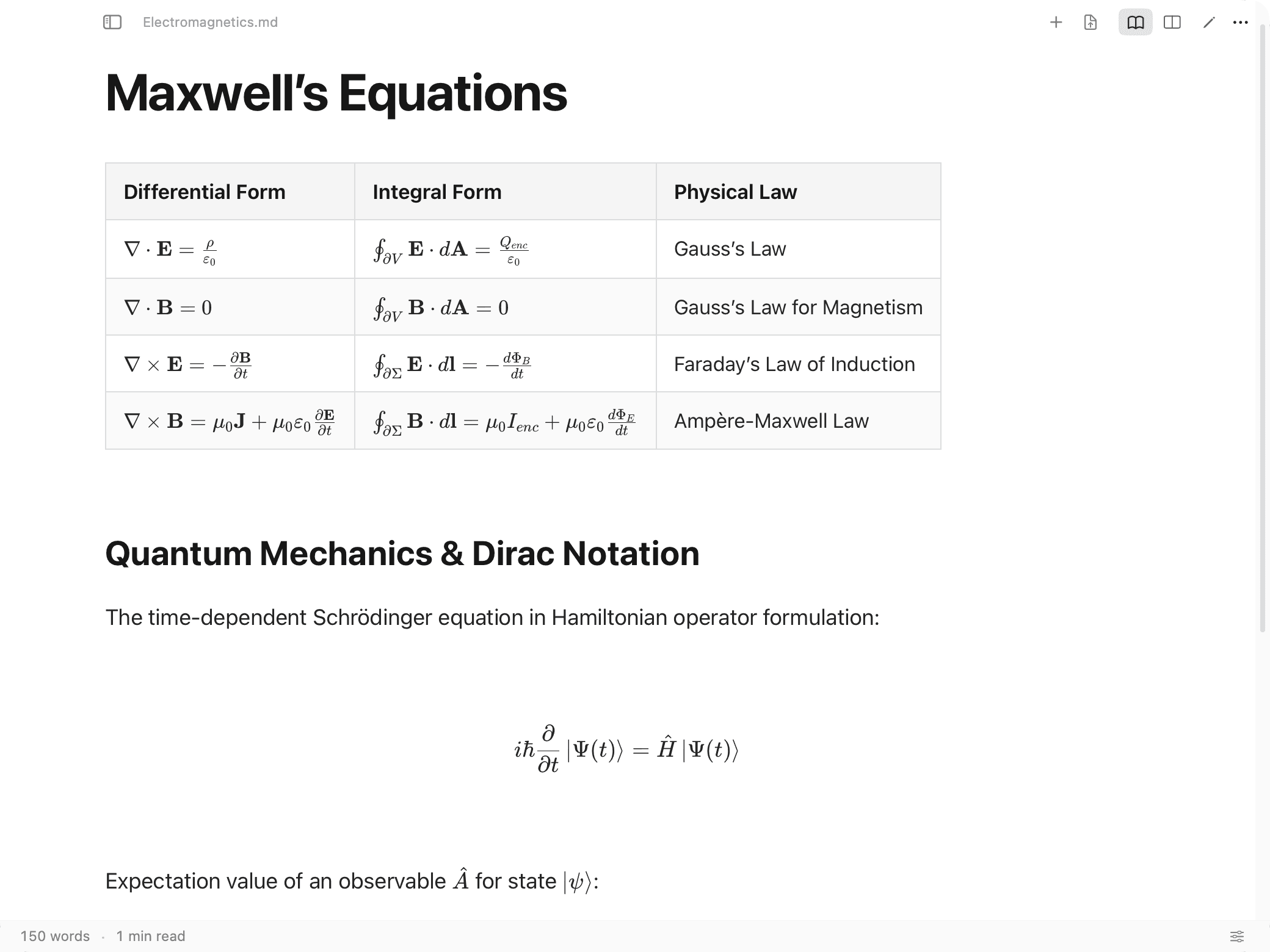
Equations, chemical formulas, wide tables, code blocks, and callout alerts belong in the same document. Lucid renders them with publication-level typographic harmony.
1. Control Systems & Lithium-Ion Electrochemistry
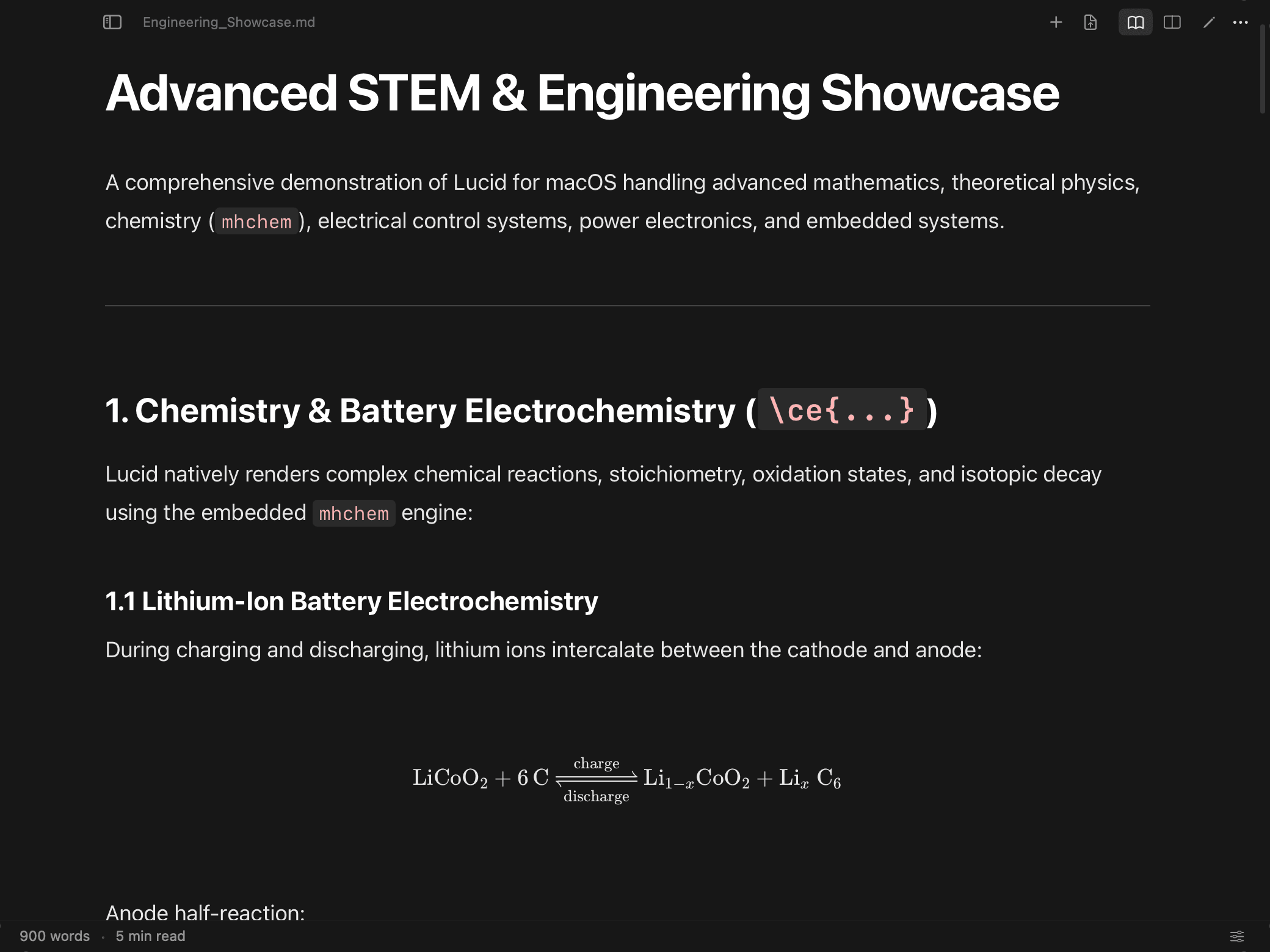
During rapid charging and discharging cycles, lithium ions intercalate between the cathode and anode. In Lucid, chemical equations written with \ce{...} and mathematical notations are rendered cleanly in-line:
import numpy as np
from scipy import signal

# State-Space System Matrices
A = np.array([[0, 1], [-2, -3]])
B = np.array([[0], [1]])
C = np.array([[1, 0]])
D = np.array([[0]])

# Desired Closed-Loop Pole Locations
desired_poles = np.array([-2.0 + 2.0j, -2.0 - 2.0j])
K = signal.place_poles(A, B, desired_poles).gain_matrix

print(f"Computed State-Feedback Gain K: {K}")| Differential Form | Integral Form | Physical Law |
|---|---|---|
| ∇ · E = ρ / ε₀ | ∮ E · dA = Q_enc / ε₀ | Gauss's Law |
| ∇ · B = 0 | ∮ B · dA = 0 | Gauss's Law for Magnetism |
| ∇ × E = -∂B / ∂t | ∮ E · dl = -dΦ_B / dt | Faraday's Law of Induction |
All equation and formula rendering runs locally via bundled KaTeX and mhchem WebEngine modules. No external network requests are made.
Diagrams you can actually read.
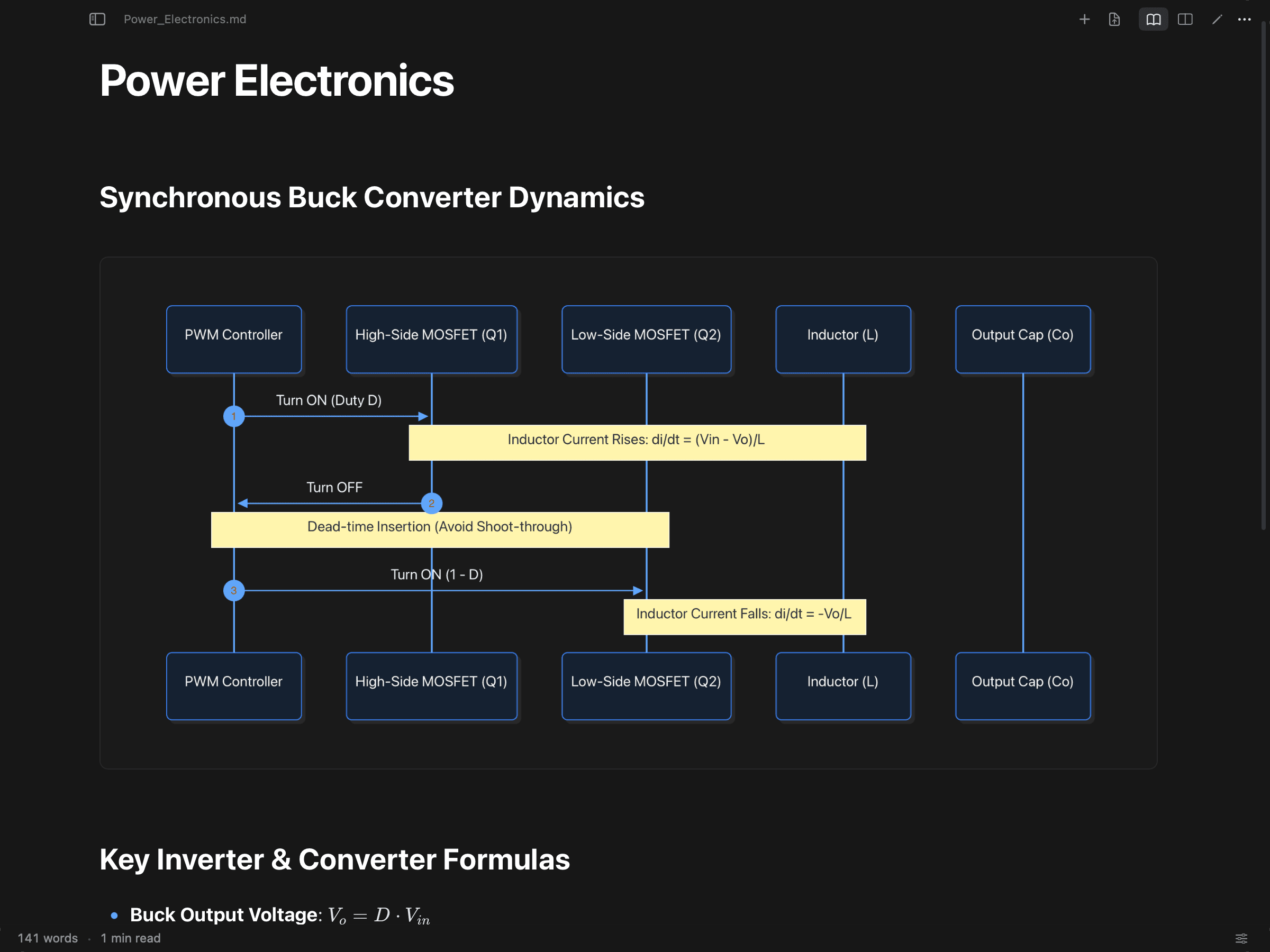
Standard Markdown tools shrink wide diagrams until labels become unreadable micro-text. Lucid prioritizes human readability: diagrams render at full typographic scale, with dedicated pan, zoom, fit, and SVG export controls.
Pan Tool
Drag and inspect large architecture diagrams without selecting text.
Zoom In / Out
Continuous precision zoom (+15% / −13%) for deep node inspection.
Fit Viewport
Quickly scale complex multi-layer graphs to the document frame.
Reset View
Instantly return to the calibrated, 1:1 readable baseline view.
Copy & Export SVG
Export crisp vector SVGs for presentations, documentation, and Keynote.
Three modes. One coherent workflow.
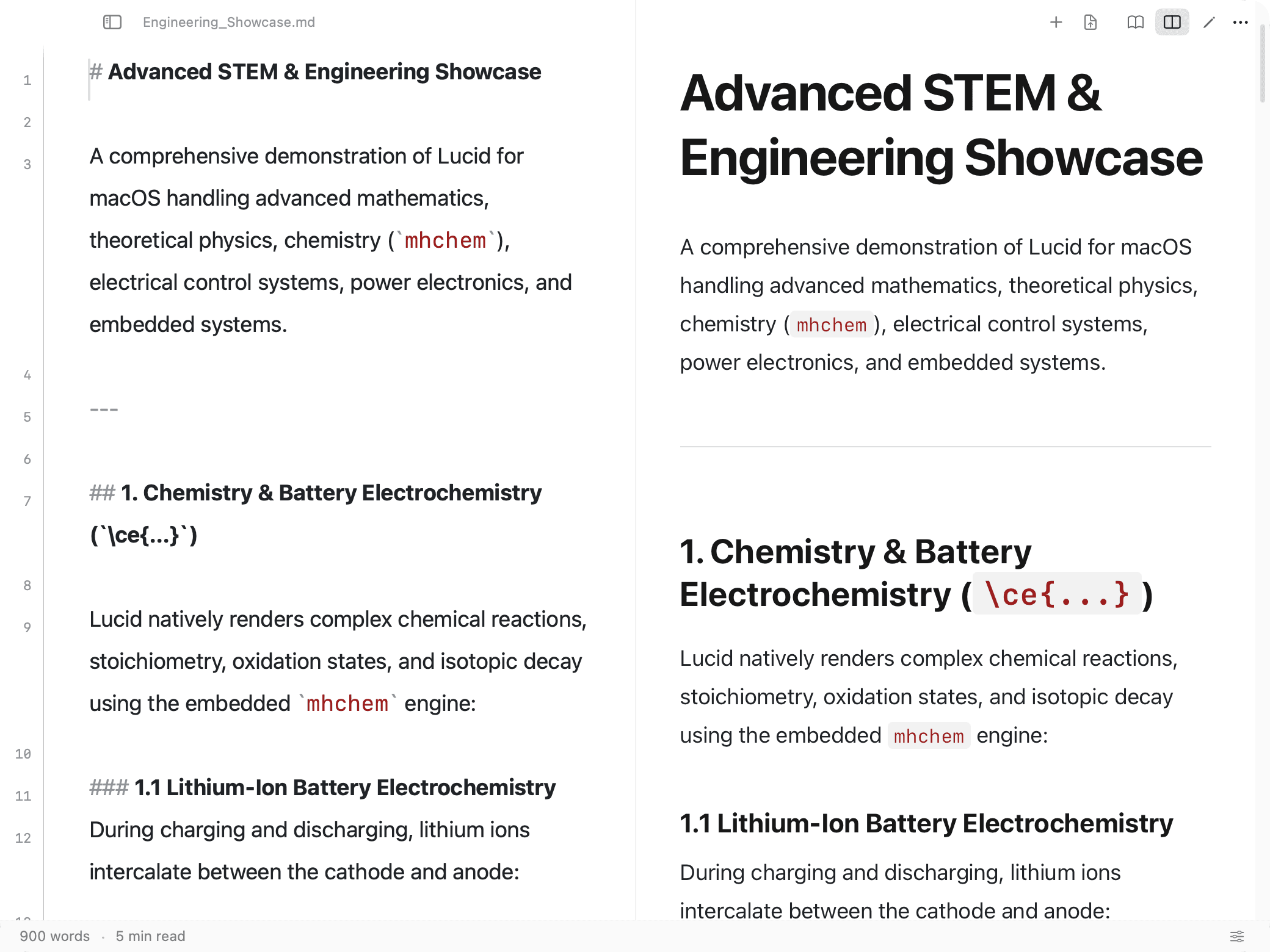
Switch effortlessly between pure reading, side-by-side editing, and focused Markdown source with standard macOS shortcuts (⌘1, ⌘2, ⌘3).
Reader Mode
Clean, distraction-free reading canvas.
Hides source code completely to present an editorial reading experience with floating glass chrome.
Split Mode
Synchronized editing and live preview.
Edit Markdown source on the left while observing the rendered document on the right, perfectly in sync.
Editor Mode
Focused raw Markdown source writing.
Full-width native NSTextView editor with line numbers, monospaced typography, and zero distractions.
Know where you are.
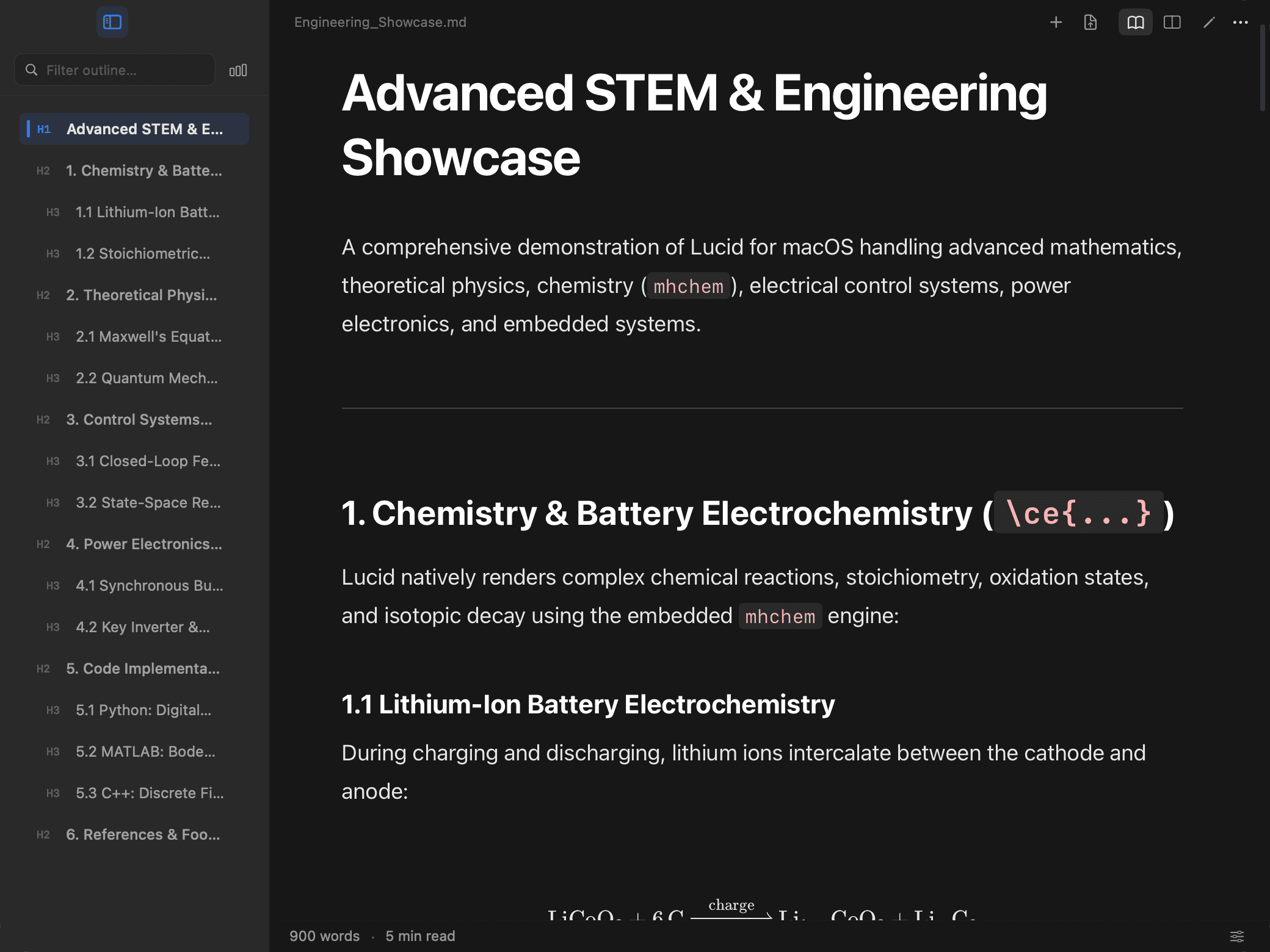
When working with multi-thousand-line technical specifications, losing your place slows down thinking. Lucid features a live heading outline sidebar with scroll-spy and instant filtering.
- ⌃⌘SToggle Sidebar: Instantly reveal or collapse the hierarchical document map.
- ⌘FIn-Document Find: Floating find bar with Next (⌘G) and Previous (⇧⌘G) match navigation.
- Live SpyScroll-Spy Tracking: The active section highlights smoothly as you navigate through long documents.
Anything important is close.
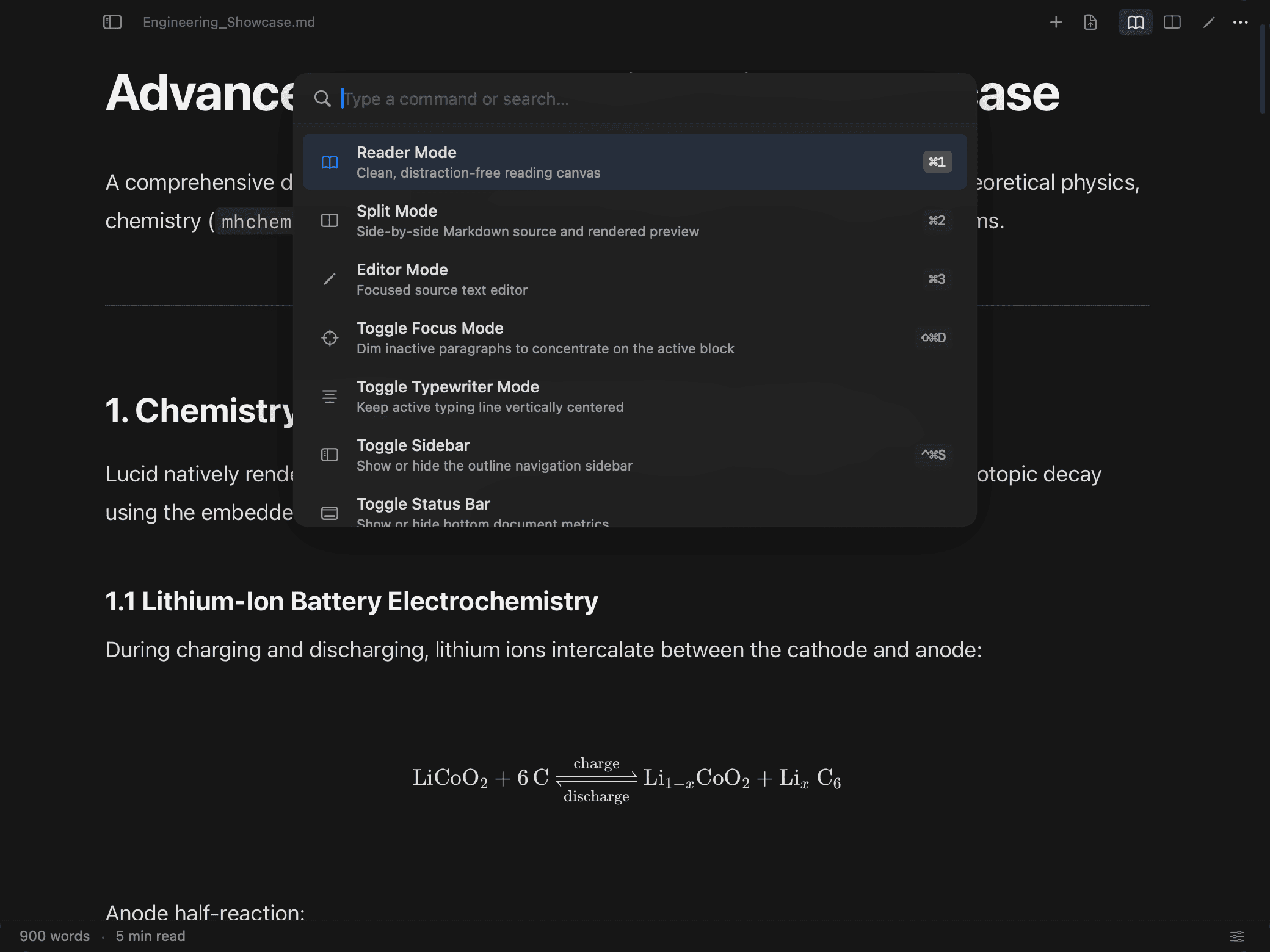
Never hunt through multi-level menus. The native Command Palette brings every document mode, curated theme, reading preset, and export action to your fingertips with fuzzy search.
Switch themes, jump between modes, insert templates, or export to PDF without touching the trackpad.
Curated for focus. Configurable when needed.
Lucid provides meticulously calibrated themes — not just inverted colors. Each theme balances contrast, syntax colors, table rules, and math rendering for its ambient environment.
Typography & Scale
Adjust base font size (⌘+, ⌘-, ⌘0), line height, reading column width, and monospaced code sizing from Settings (⌘,).
Focus & Typewriter Modes
Dim inactive blocks with Focus Mode (⌘⇧D) or keep your active cursor vertically centered with Typewriter Mode.
Accents & Presets
Personalize your interactive accent color and apply curated density presets (Compact, Default, Comfortable) instantly.
Native where it matters.
Lucid pairs native macOS AppKit windowing, file management, and keyboard handling with an offline WebKit rendering pipeline designed for rich technical Markdown.
AppKit Windowing & Vibrant Chrome
Lucid's floating toolbar is a native NSVisualEffectView. Content scrolls naturally beneath translucent glass with scroll-responsive depth, optically aligned with macOS traffic lights.
FSEvents Live File Watching
Edit your documents in Neovim, VS Code, or Obsidian. Lucid listens to macOS kernel file-system events, refreshing the rendered view instantly upon save without resetting your reading position or expanding collapsibles.
Local-First Sandboxed Execution
Your notes, equations, and diagrams remain strictly on your Mac. All parsing, KaTeX math symbols, mhchem reactions, and Mermaid graph engines run offline from local bundled assets.
- Target Platform
- macOS 14.0+ (Sonoma)
- CPU Architecture
- Apple Silicon (arm64)
- Binary Footprint
- 6.7 MB (no Electron/Chromium)
- Window Subsystem
- Native AppKit + NSVisualEffectView
- Canvas Engine
- Bundled WebKit (offline local bridge)
- File Watching
- macOS FSEvents kernel integration
- Network Access
- Zero outgoing telemetry pings
Frequently Asked Questions
Clear, honest answers about Lucid's capabilities, platform support, and security.
Markdown, made lucid.
Experience equations, chemistry, Mermaid diagrams, and technical tables in a quiet, native macOS environment.